All Document Reader: Word, PDF
- 4.3
- Rating
- 1.00M
- Installs
- Free
- Price
 Analysis by App-foxy
All Document Reader: Word, PDF is the kind of Android tool I reach for when a file arrives at the wrong moment: a PDF in an email, a DOCX sent by a colleague, a spreadsheet needed before a meeting, or a presentation I want to check without opening a laptop. I reviewed it as a practical document utility rather than as a full office suite, and that distinction matters. Its appeal is bringing several common file types into one place, while its limitations become clearer when a document needs serious editing, collaboration, or dependable access during a poor connection.
Developed by SolaraSoft, this free app sits in the tools category and is aimed at everyday reading and file management. It supports PDF, DOCX, XLSX, PPT, and TXT files, which covers a useful slice of the documents most people encounter on a phone. The app is rated for Everyone, works from Android 8.0 onward, and its current version is 1.4.8-Doc-Solara. I found its strongest argument to be convenience: fewer separate viewers to think about when the immediate task is simply opening, checking, and organizing a document.
How connectivity changes the document-reading experience
I find connectivity matters most before a document even reaches the reader: a file may still be waiting in email, a chat, or cloud storage. In this section, I look at how preparing the file in advance can make a quick check more dependable, and why keeping the original source in reach is a useful habit when a handoff stalls.
You May Also Like

 Blood Strike: 2.5 Anniversary
Blood Strike’s Loadouts Turn Every Drop Into a Tactical Gamble
A close look at Blood Strike’s custom loadouts: how fast access to signature weapons reshapes its battle royale rhythm, rewards preparation, and narrows the gap between fights.

 Pandora - Music & Podcasts
Pandora’s Music Is Easy to Start, but Harder to Recover
Pandora’s strength is its low-effort path from a seed to a station. Its weak spot is how much confidence it asks you to place in connection, setup, and quiet recovery.

 8 Ball Pool
 Is Built on Rivalries, Rematches, and Routine
A close look at the rivalries, rematches, shared routines, and unanswered safety questions that turn a quick pool match into a persistent mobile community.

 Samsung Music
’s Quiet Strength Is Playing What You Already Own
Its reach comes less from spectacle than from dependable access to a personal library. That simplicity is both the app’s strongest retention engine and its ceiling.

 AccuWeather: Weather Radar
AccuWeather Review: A Quick, Clear Forecast for Everyday Decisions
For everyday plans, the best forecast is the one you can understand quickly. AccuWeather makes rain timing, radar, and local conditions easy to act on, with a few trade-offs.

 Hill Climb Racing
Why Hill Climb Racing Still Turns Crashes Into One More Run
A tiny car, a bumpy hill and one more upgrade: Hill Climb Racing keeps resurfacing because its simple chaos makes every near-miss feel personal.
More From Our News Desk



The first useful test is getting a file into the app
A document reader is only as convenient as the path between the file and the screen. In real use, that path often begins with a network service: an email attachment, a cloud-storage notification, a messaging conversation, or a workplace portal. All Document Reader: Word, PDF becomes useful once the document is available to the phone, but it does not remove the conditions that affect that first step. If the file is still online, a weak connection can delay the moment when reading can begin.
This is an important distinction from the simple promise of “one reader for everything.” The app can bring supported formats together, but it cannot make a remote attachment appear instantly when the network is slow. I would therefore install it before a trip, a class, or a workday rather than waiting until I am standing in a place with unreliable reception. That small bit of preparation changes the experience more than any interface detail.
When a file has already reached the device, the app’s multi-format approach saves time. I do not need to remember which dedicated viewer handles a particular extension, especially when moving between a PDF agenda, a DOCX draft, and an XLSX table. That is a genuine advantage over relying on whichever app happens to be associated with each file type. It is less about replacing every specialist tool and more about reducing interruptions during quick checks.
Mobile reading is where the all-in-one approach makes sense
I found the concept most convincing in short mobile sessions. Imagine receiving a meeting pack while walking between appointments. A PDF contains the agenda, a DOCX contains notes, and an XLSX contains figures. On a phone, opening each item through a different application creates unnecessary friction. A single reader gives me a more predictable starting point, even though the documents themselves still have different layouts and demands.
PDFs are usually the easiest files to approach on a small display because their layout is fixed. Word documents can be comfortable for reading, but complex formatting may require more zooming and scrolling. Spreadsheets are the most demanding of the supported formats: narrow screens make columns difficult to compare, and a large table is rarely pleasant to inspect for long. Presentations can be checked quickly, although a phone is not the ideal place to judge every visual detail on a slide.
That leads to a useful rule: use this app for fast document triage, not automatically for every stage of a document workflow. I would use it to confirm that an attachment is the right file, locate a paragraph, check a figure, or review a slide before a conversation. For detailed editing, formula work, tracked changes, or polished presentation review, a dedicated office application or a larger screen is usually the better choice.
A realistic everyday workflow
My practical workflow would start with a file arriving through a connected service. I would open it, check the extension, and use the reader to decide whether it needs immediate attention. If it is a short PDF, I can read it directly. If it is a DOCX proposal, I might scan headings and key sections before deciding whether it needs a proper editing tool. For an XLSX file, I would verify the relevant row or value but avoid treating a phone screen as a replacement for a full spreadsheet workspace.
This approach also helps keep network use purposeful. Instead of repeatedly reopening the same attachment from an email or chat thread, I would first make sure the document is available to the device, then read it in the reader. The app’s value here is not a magical connection to every service; it is the simpler handoff from “I have a file” to “I can inspect this file.”
There is a trade-off, though. An all-in-one reader can feel more convenient than a collection of specialist apps, but it may not match the depth of the application that created the document. A spreadsheet produced for detailed analysis may be better handled by a spreadsheet editor. A heavily formatted Word file may deserve Microsoft Word or another compatible office suite. The reader is strongest when speed and breadth matter more than advanced control.
What happens when the connection fails?
Connectivity problems usually appear at the least convenient time: an attachment will not finish loading, a message containing the file is slow to open, or a cloud location takes too long to respond. The key recovery step is to separate the network problem from the reader problem. I would first check whether other content loads, then try obtaining the file through the original source again. If the file reaches the phone but still will not open, I would confirm that it is one of the supported formats and retry from the system’s file-sharing action.
I would not assume that every document can be read without a connection simply because the app is installed. The safe habit is to test the exact files you need before leaving dependable coverage. Open them while connected, make sure they are accessible in the location where you expect to find them, and avoid relying on a document that exists only as a remote attachment. This is especially important for travel, examinations, presentations, and appointments where a missing file creates more trouble than the reading itself.
Another practical recovery method is to keep the original source available. If an unusual conversion, damaged attachment, or incomplete transfer causes trouble, the app should not be the only copy you depend on. I would return to the email, message, or storage service and obtain the file again rather than repeatedly forcing the reader to handle a questionable copy. That is not a criticism unique to this app; it is simply good document hygiene on a mobile device.
Being careful with data use
For people with limited mobile data, the largest network cost may come before reading begins. Large presentations, image-heavy PDFs, and spreadsheets with many embedded elements can take longer to retrieve than a plain text file. I would avoid opening every attachment automatically over cellular data and would prioritize the documents I actually need. A quick scan of the file name and type can prevent unnecessary downloads.
The five supported formats also behave differently from a data-conscious perspective. TXT files are generally straightforward to inspect, while presentation and spreadsheet files may contain more visual material. A PDF that looks simple on the page can still be substantial if it contains many images. Because the app is designed to handle several formats, I would treat it as a reader and organizer after the file arrives, while managing the download decision at the source.
There is another reason to think about data flow: documents can contain sensitive information. A work contract, medical note, or financial spreadsheet deserves the same care whether it is opened in this reader or another application. I would avoid forwarding private files casually, keep the original sharing context in mind, and use a trusted connection when obtaining important documents. The convenience of a single reader should not encourage careless handling.
Where it fits beside familiar alternatives
Compared with using separate viewers for PDF, Word, spreadsheet, presentation, and text files, All Document Reader: Word, PDF offers a simpler starting point. That is particularly useful for someone who receives many file types but does not want to build a complicated app collection. It also makes sense for a secondary phone, a family device, or a user whose main requirement is reading rather than authoring.
Compared with a full office suite, the choice is less straightforward. A dedicated office suite is usually preferable when I need editing tools, collaboration, formatting control, or deep spreadsheet functions. Compared with a PDF specialist, this app is broader but may be less attractive to someone who works almost exclusively with PDFs and wants advanced annotation or document-specific controls. The right choice depends on whether variety or depth is the priority.
Its free price lowers the barrier to trying that broader approach, but the presence of in-app purchases ranging from $19.99 to $29.99 per item means I would inspect any upgrade screen carefully before confirming a purchase. I would start with the free experience and judge it against my actual routine. If I only open occasional attachments, paying for extras may not make sense; if the app becomes part of a regular document workflow, the value depends on what those optional purchases provide at the moment of use.
Who will appreciate it, and who should skip it?
I would recommend it to students checking course files, commuters reviewing short documents, families opening forms, and workers who need a quick look at mixed attachments. It is also a sensible option for anyone tired of guessing which installed application can open a particular file. The combination of PDF, DOCX, XLSX, PPT, and TXT support gives it a practical range without requiring the user to think in technical terms.
I would be more cautious about recommending it to professionals who edit documents all day, analysts who depend on complex spreadsheets, or presenters who need to verify every slide at full size. Those users may appreciate a quick viewer, but they will probably want a more specialized tool as their main workspace. I would also skip it if my only requirement were one advanced document format and I already had a trusted specialist application that handles that format well.
The app has attracted a 4.3 average from around 4.1 thousand ratings, with over a million installs, so it clearly has a substantial audience for this general-purpose approach. I read those figures as evidence of broad usefulness rather than proof that it will satisfy every professional workflow. A popular multi-tool can still be the wrong choice for a person whose needs are narrow and demanding.
Small habits that make the app more useful
My first tip is to classify documents by urgency before opening them. A PDF needed for a meeting deserves immediate attention, while a long presentation can wait for a stronger connection or a larger screen. This prevents the app from becoming a place where every attachment is opened impulsively and helps keep mobile data under control.
My second tip is to use the reader as a verification layer. Before editing a document, I would check whether the received file is complete, whether the pages display sensibly, and whether the important values are present. This is particularly useful for XLSX files, where a quick check can reveal that I received an outdated version before I spend time working on it elsewhere.
My third tip is to plan around screen size. For PDFs and text, portrait reading may be comfortable. For spreadsheets and wide slides, rotating the phone or postponing the review until a larger display can prevent mistakes. A reader can make a file accessible without making every file equally readable. Recognizing that difference is part of using the app well.
Finally, I would keep expectations clear around connectivity. I would not promise myself that an important document will be available merely because the reader is installed. I would obtain the file early, test it in the app, and retain the original source until the task is finished. That habit improves reliability without assuming any particular offline behavior from the application.
My connectivity verdict
All Document Reader: Word, PDF is a useful general-purpose tool when the problem is variety: too many document types, too many quick checks, and too much time lost switching between viewers. SolaraSoft has positioned it well for mobile reading and basic file management, especially for people who want a straightforward place to inspect PDFs, Word files, spreadsheets, presentations, and text documents.
Its relationship with connectivity is more practical than transformative. The app can simplify what happens after a file reaches the phone, but the quality of the network still affects retrieval, timing, and preparation. I would use it confidently for everyday checks, while making a deliberate plan for important documents and avoiding the assumption that a multi-format reader replaces a full office suite.
At no cost to install, with an Everyone age rating and support beginning at Android 8.0, it is easy to test against your own files. My final recommendation is positive for casual readers and mobile users who value breadth. For advanced editing, complex spreadsheets, or high-stakes access during unreliable connectivity, I would pair it with a specialist tool and a prepared copy of the documents. Its real strength is reducing friction, not eliminating every part of the document workflow.
In my experience, that makes it a sensible app to keep available even if it is not the only document tool on the phone. The current 1.4.8-Doc-Solara version is best judged by a simple question: do you often need to open different file types quickly, without demanding full editing power? If the answer is yes, All Document Reader: Word, PDF is a convenient fit. If the answer is no, a focused reader may serve you better.
FAQs for All Document Reader: Word, PDF
01What file formats does All Document Reader support?
All Document Reader supports a wide variety of file formats, including PDF, DOC, DOCX, PPT, PPTX, XLS, XLSX, and TXT. This versatility makes it a convenient tool for users who frequently work with different types of documents on their mobile devices.
02Is All Document Reader free to use?
Yes, All Document Reader is available for free download. However, it may offer in-app purchases or a premium version with additional features, such as ad removal or enhanced tools. Users can choose to upgrade if they find the extra features beneficial for their needs.
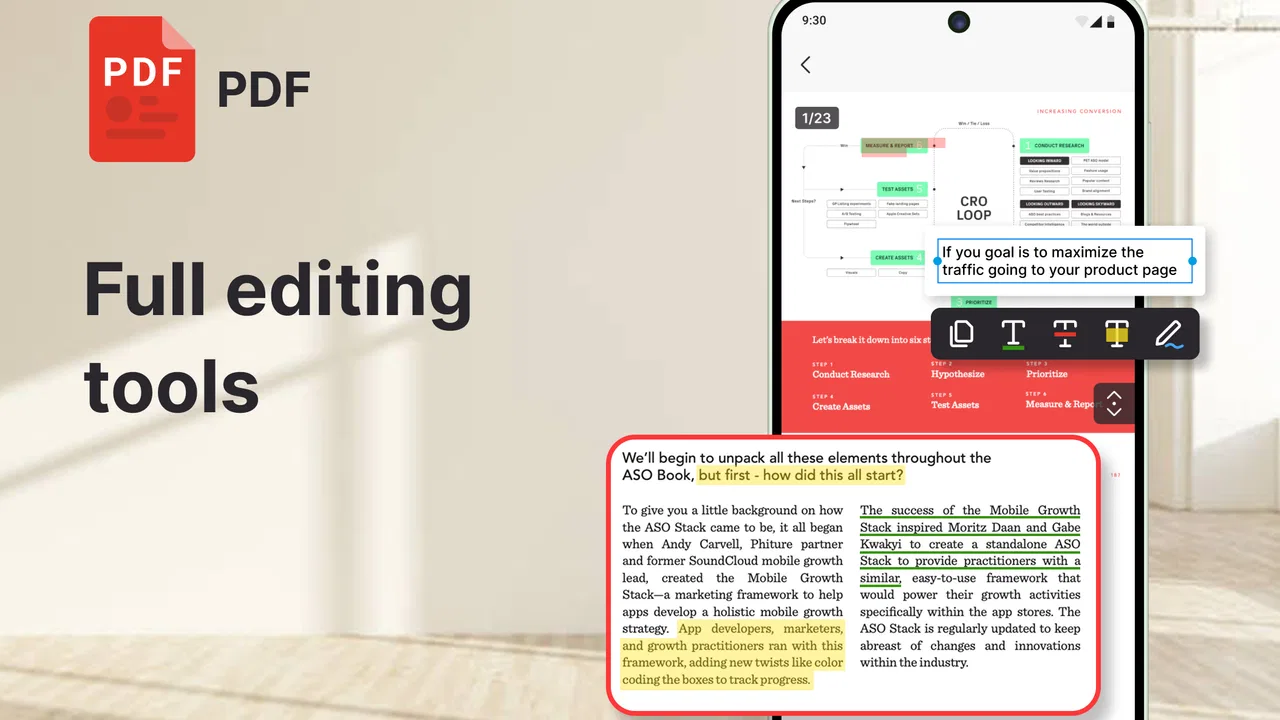
03Can I edit documents using All Document Reader?
All Document Reader primarily focuses on providing a seamless document viewing experience. While it excels in opening and reading various file types, it may not offer comprehensive editing capabilities. Users looking for robust editing tools might need a separate app specifically designed for document editing.
04Does the app require an internet connection?
All Document Reader can open and read documents offline, which makes it convenient for users on the go or in areas with limited connectivity. However, certain features, such as cloud storage access, might require an internet connection to function properly.
05Is All Document Reader secure to use?
All Document Reader is generally secure to use, as it doesn't require document uploads to an external server. It reads files directly from your device, maintaining privacy. However, it’s always advisable to review app permissions and ensure you’re downloading from a trusted source like the Google Play Store or Apple App Store.
Pros
- Supports multiple file formats seamlessly.
- Fast loading times for large documents.
- Intuitive and user-friendly interface.
- Offline access to all saved files.
- Easily share documents via email or apps.
Cons
- Contains ads that can be intrusive.
- Limited editing features for documents.
- No cloud sync options available.
- Occasional crashes on older devices.
- Requires in-app purchases for premium features.

All Document Reader: Word, PDF
Gallery